---
title: Adjusting VR Experience Volume Levels (EL Classroom / Quest)
description: If you need to adjust the volume levels for the audio in our VR experiences, and when viewing the in-headset experience via the EL CLassroom, there are a few different areas you can check and adjust.
---
[Skip to content](https://resource.embodiedlabs.com/adjusting-classroom#main-content)
English
Show submenu for translations
[Submit a Support Ticket](https://resource.embodiedlabs.com/kb-tickets/new) [Customer portal](https://resource.embodiedlabs.com/partnerportal)
![Embodied Labs Registered Logo 684x389 full white.png\]](https://resource.embodiedlabs.com/hs-fs/hubfs/Embodied%20Labs%20Registered%20Logo%20684x389%20full%20white.png?height=50&name=Embodied%20Labs%20Registered%20Logo%20684x389%20full%20white.png)
- [Default HubSpot Blog](https://www.embodiedlabs.com/news)
Open main navigation
Close main navigation
- [Default HubSpot Blog](https://www.embodiedlabs.com/news)
- English
Show submenu for translations
- [Submit a Support Ticket](https://resource.embodiedlabs.com/kb-tickets/new)
- [Customer portal](https://resource.embodiedlabs.com/partnerportal)
- [Go to app.embodiedlabs.com](https://app.embodiedlabs.com/)
[Go to app.embodiedlabs.com](https://app.embodiedlabs.com/)
Hello. How can we help you?
- There are no suggestions because the search field is empty.
1. [Help Center](https://resource.embodiedlabs.com/)
2. [EL Classroom / Meta Quest](https://resource.embodiedlabs.com/el-classroom-meta-quest)
# Adjusting VR Experience Volume Levels (EL Classroom / Quest)
## If you need to adjust the volume levels for the audio in our VR experiences, and when viewing the in-headset experience via the EL CLassroom, there are a few different areas you can check and adjust.
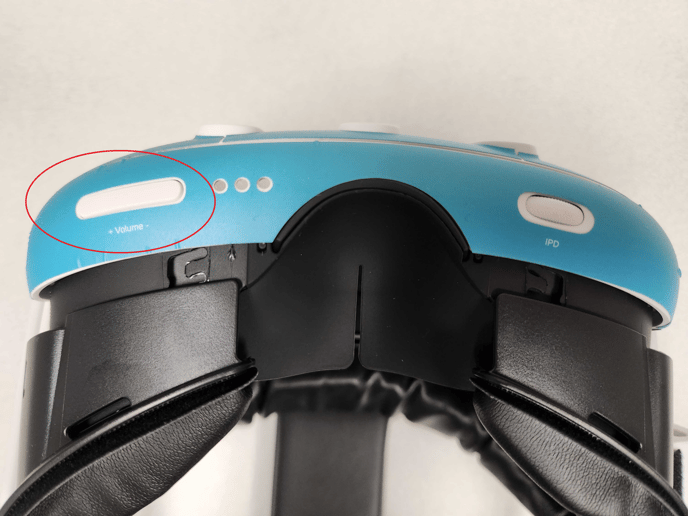
### 1. Change volume on headset
The in-headset experience has it's volume controlled entirely by the headset, you can set a comfortable volume using the rocker located at the bottom of the headset:
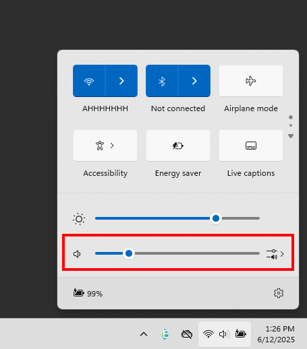
### 2\. Windows System Volume
When watching the in-headset experience in the EL Classroom app on desktop, you can change the volume using the Windows quick volume setting in the toolbar on the bottom-right of your screen by left-clicking the sound/speaker icon:
- [Getting Started](https://resource.embodiedlabs.com/getting-started#main-content)
- [Getting Started](https://resource.embodiedlabs.com/getting-started#getting-started)
- [How-To](https://resource.embodiedlabs.com/how-to#main-content)
- [Implementing the Labs](https://resource.embodiedlabs.com/how-to#implementing-the-labs)
- [Desktop App](https://resource.embodiedlabs.com/how-to#desktop-app)
- [Miscellaneous](https://resource.embodiedlabs.com/how-to#miscellaneous)
- [Frequently Asked Questions](https://resource.embodiedlabs.com/frequently-asked-questions#main-content)
- [The Basics](https://resource.embodiedlabs.com/frequently-asked-questions#the-basics)
- [Subscription](https://resource.embodiedlabs.com/frequently-asked-questions#subscription)
- [Troubleshooting](https://resource.embodiedlabs.com/troubleshooting#main-content)
- [Hardware (Kits)](https://resource.embodiedlabs.com/troubleshooting#hardware-kits)
- [Desktop App](https://resource.embodiedlabs.com/troubleshooting#desktop-app)
- [Support](https://resource.embodiedlabs.com/support#main-content)
- [Contact Us](https://resource.embodiedlabs.com/support#contact-us)
- [More](https://resource.embodiedlabs.com/more)
- [EL Classroom / Meta Quest](https://resource.embodiedlabs.com/el-classroom-meta-quest#main-content)
- [How to](https://resource.embodiedlabs.com/el-classroom-meta-quest#how-to)
- [Default HubSpot Blog](https://www.embodiedlabs.com/news)
[](https://resource.embodiedlabs.com)
Help Center | Copyright 2022 Embodied Labs, Inc.
Copyright © 2026, Embodied Labs